Varnuqel
Axis Map
Axis Map
Couldn't load pickup availability
1. Problem Statement
After an introductory look at .NET Framework, many learners face a new challenge: they understand separate terms, but they do not yet see the full map. A class may be clear on its own, and a method may look simple, but together they can feel like disconnected fragments without a clear direction. A learner may complete a separate exercise, but not always understand how that exercise connects to the next topic. Because of this, learning can lose sequence, and materials may begin to feel like a set of sections rather than one organized system. At this stage, learners need a plan that explains not only separate elements, but also the links between them.
2. Solution
Axis Map is built as a learning map where each topic has its place and a logical connection to the next one. The materials help learners move from simply reading examples to understanding how a small code structure is formed. Lessons are presented through explanations, fragment review, practice tasks, and short summaries after each block. Special attention is given to how a class, method, variable, and condition work together within one learning scenario. This format helps learners avoid getting lost between topics and gradually develop careful code analysis skills.
3. What’s Inside
Axis Map includes an expanded introduction to .NET Framework structure, with the main focus on links between basic elements. While Free Kit introduced the format and first concepts, Axis Map creates a learning map: what to study first, how to connect topics, and how to read small examples as parts of one logic.
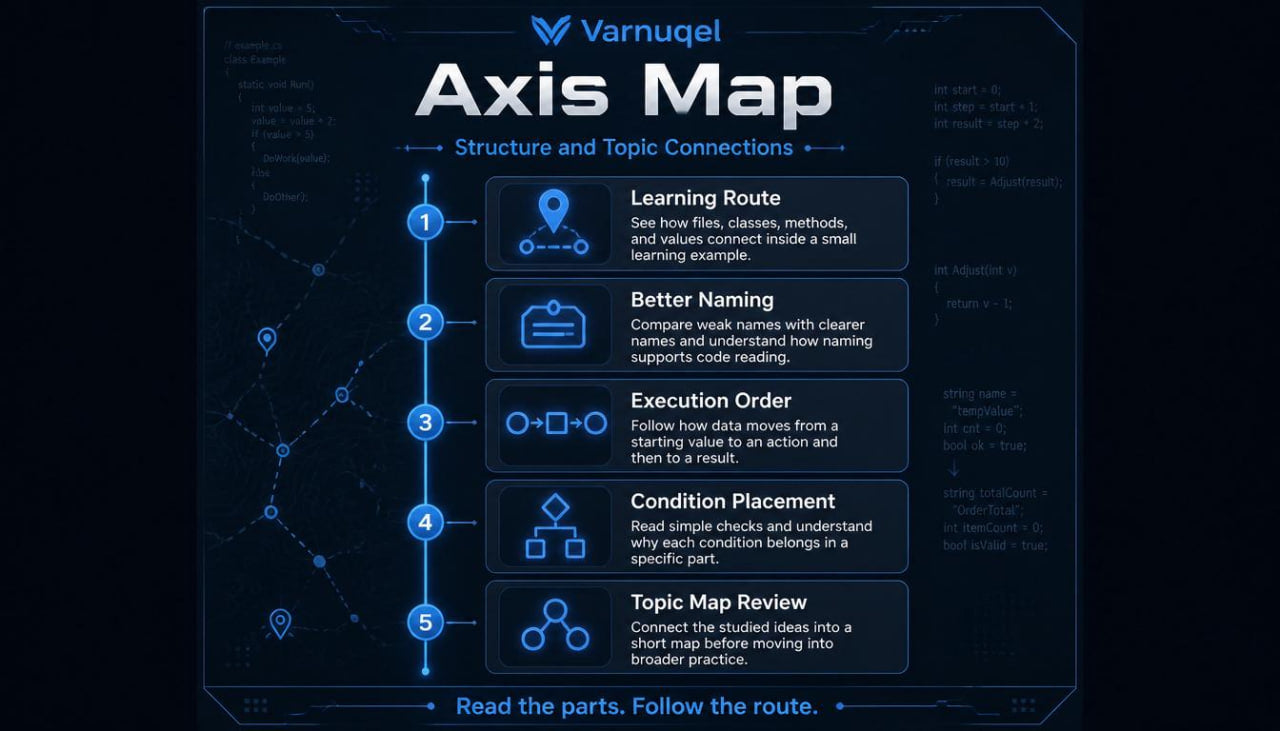
The first module is dedicated to orientation inside a learning project. The learner reviews what a simple structure may look like: separate files, class names, method placement, and action order. The materials explain why it is important to see not only a line of code, but also its role in a broader structure. For example, one class may describe data, another may handle processing, and a method may perform a specific action inside the scenario. At this stage, large diagrams are not needed; the main goal is to learn to view an example not as one block of text, but as a set of connected parts.
The second module reviews naming and structure. The learner studies how names of classes, methods, and variables affect the way an example is read. The materials show why overly general names can create confusion, while clear names help learners follow the logic without guessing. In the exercises, the learner compares several versions of one fragment, identifies weak naming points, and suggests a better structure. This develops attention to detail, which is useful for later topics.
The third module explains execution order. The learner sees how data moves through a simple scenario: creating a value, passing it into a method, processing it, and returning a result. The materials include exercises where learners place steps in the correct order, find the main action, and describe what happens at each stage. This approach helps learners understand not only syntax, but also the movement of logic inside an example.
The fourth module focuses on conditions and simple decisions in code. The learner reviews situations where the result depends on a certain value: for example, whether to show a message, perform a calculation, or move to another action. The materials explain how to read conditional constructions, how not to confuse a check with an action, and how to describe a condition in plain language. The exercises are built so the learner not only changes values, but also explains why the result changed.
The fifth module introduces the idea of a small learning scenario. Several topics come together here: class, method, variable, condition, and result. The learner works with examples where they identify which part handles data, which part handles processing, and which part presents the final output. This helps learners move from isolated exercises to a more complete view of the material.
The sixth module contains a practice block with short tasks. The learner reads fragments, corrects simple structural issues, rewrites names, adds small conditions, and explains their changes. The tasks do not require complex construction, but they give space to work with logic, structure, and sequence.
The seventh module closes the plan with a topic map. It shows which concepts have already been reviewed, how they connect, and which topics are suitable for later study. The learner receives a short learning route for moving into the next plan, Pulse Guide, where more attention is given to practical explanations, thinking patterns, and review of common learning tasks.
4. Who Is This For?
Axis Map is for learners who already have a short introduction to .NET Framework and want to better understand the structure of learning. This plan is for those who have seen basic examples but do not always understand how separate fragments work together. It is useful for beginners after the introductory plan, and also for those who started studying the topic before but paused because the sequence was unclear.
This plan is also suitable for learners who want to see a route before moving into more detailed materials. For those who prefer learning through maps, explanations, short exercises, and summary notes, Axis Map offers that format. It does not overload learners with technical detail, but it does require more careful reading of examples and gradual structure analysis. It works as a helpful stage between the first introduction and broader learning materials.
5. What You’ll Learn
- Understand how a file, class, method, and variable are connected.
- Read small examples as parts of one logic.
- Identify the role of a separate fragment in a learning scenario.
- Work with names of classes, methods, and values.
- Notice execution order in simple examples.
- Describe data movement from an initial value to a result.
- Review conditional constructions without confusion.
- Explain why a certain action is placed in a specific part.
- Correct simple structural issues in fragments.
- Combine several basic topics in one learning task.
- Create short notes after each module.
- Prepare for the next plan through a summary topic map.
6. 30-Day Terms
For the paid Axis Map plan, a 30-day period applies during which the learner may submit a payment-related request according to the Varnuqel store terms. The terms depend on the purchase format, use of materials, and the conditions listed in the store policies. This block is written as a transparent explanation of the process, without loud claims or pressure. Before checkout, learners should carefully review the terms page to understand how the request process works. This approach keeps communication between the learner and Varnuqel calm and clear.
Self-paced learning overview
- 📁 Digital file available after purchase
- ♾️ Long-term availability
- 🔐 Secure checkout
- 🗓️ Content updated in 2026
Are the courses suitable for beginners?
Are the courses suitable for beginners?
Yes, the materials are built step by step: from basic concepts to practical tasks. Learners can move at their own pace and return to modules for review.
What is included in the learning materials?
What is included in the learning materials?
Each plan includes lessons, explanations, examples, exercises, and structured modules. The content depends on the plan depth and topic range.
Do I need previous experience with .NET Framework?
Do I need previous experience with .NET Framework?
Previous experience is not required for the first plans. More advanced plans are better suited for learners who already understand basic code logic, classes, methods, and project structure.
Share